Quick Answer
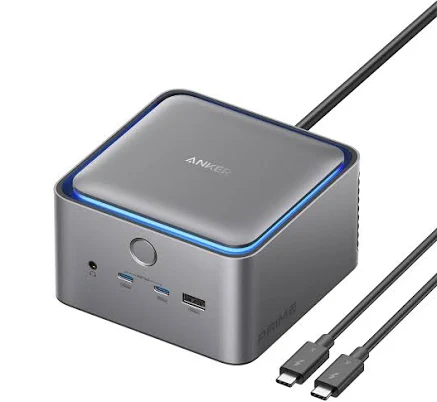
Anker Prime TB5 Docking Station
Top pick — Best for power users and professionals needing top-tier performance and future-proofing.
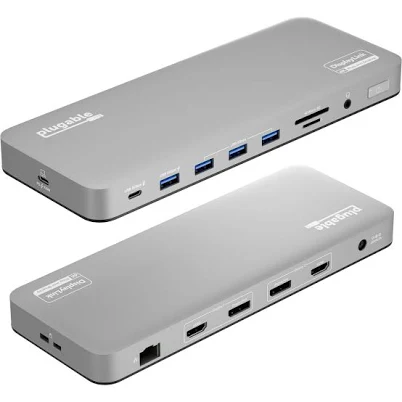
See full comparison →Plugable USB-C Dual 4K HDMI Docking Station
Top pick — A dependable choice for users needing robust dual 4K output and wide compatibility.
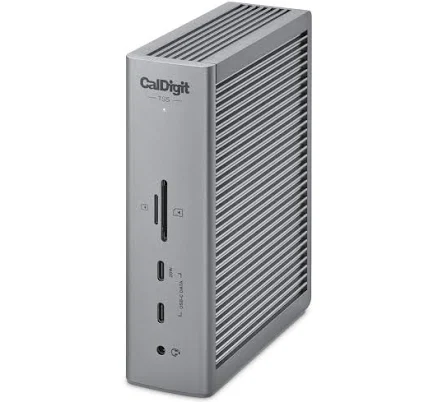
See full comparison →CalDigit TS5 Thunderbolt Dock
Top pick — A premium dock ideal for creative professionals and Mac users seeking maximum connectivity.
See full comparison →At a Glance
| Product | Score | Price | Key Specs |
|---|---|---|---|
| j5create USB-C Triple Display Docking Station jcd543 | 78 | Mid-range | display support: Triple display (HDMI/DisplayPort)power delivery: 100Wports: 10 |
| Anker Prime TB5 Docking Station | 92 | Premium | display support: Dual 8K or Triple 4Kpower delivery: 140Wports: 12 |
| CalDigit TS5 Thunderbolt Dock | 90 | Premium | display support: Dual 6Kpower delivery: 98Wports: 15 |
| Targus USB-C Universal Dual HD Docking Station | 73 | Mid-range | display support: Dual HD (1080p)power delivery: 65Wports: 7 |
| Ascrono MacBook Docking Station | 81 | Premium | display support: Dual 4Kpower delivery: 100Wports: 9 |
| Plugable USB-C Dual 4K HDMI Docking Station | 84 | Premium | display support: Dual 4K HDMIpower delivery: 100Wports: 11 |
| HP USB-C/A Universal Dock G2 | 80 | Premium | display support: Dual 4Kpower delivery: 100Wports: 10 |
| Microsoft Surface Thunderbolt 4 Docking Station | 86 | Premium | display support: Dual 4Kpower delivery: 96Wports: 10 |
What to Look For
Thunderbolt vs. USB-C: Know Your Connection
Thunderbolt 4 and USB4 docks offer up to 40Gbps of bandwidth, enabling dual 4K displays and fast external storage simultaneously. USB-C docks are more affordable and broadly compatible but have lower bandwidth ceilings. Always verify your laptop's port type before purchasing.
Power Delivery: Keep Your Laptop Charged
A good work dock should charge your laptop while connected. Look for at least 65W power delivery for ultrabooks and 90W or higher for performance laptops. Insufficient wattage means your battery drains during intensive tasks, defeating the purpose of a single-cable setup.
Display Output: Match Your Monitor Setup
Confirm that the dock supports your exact monitor configuration — dual 4K, triple 1440p, or mixed resolutions. Some docks require DisplayLink drivers for multi-monitor support on certain laptops, which can introduce minor latency. Check compatibility charts carefully before buying.
Port Selection: Plan for All Your Peripherals
Count the ports you actually use daily: USB-A for keyboards and mice, USB-C for fast charging phones or external drives, 3.5mm audio, SD card slots, and Ethernet. A dock that covers your full peripheral ecosystem eliminates the need for additional hubs or adapters.
Build Quality and Longevity
Docks that run hot or use cheap internal components tend to fail faster and can cause intermittent disconnections. Prioritize models with metal enclosures, adequate ventilation, and manufacturers that provide firmware updates. A reliable dock should last as long as your laptop does.
How We Chose
When evaluating the best docking station for work, the most important starting point is compatibility. Not every dock works equally well with every laptop. Thunderbolt 4 and USB4 docks offer the highest bandwidth and are ideal for demanding creative or engineering workflows, while USB-C docks are more universally compatible and budget-friendly for general office tasks. We focused on docks that reliably deliver stable power delivery, consistent video output, and dependable data transfer without requiring constant driver updates or reboots. Thermal management also played a role — docks that run cool under sustained loads are far less likely to throttle performance during long workdays. Finally, we considered the real-world port selection that modern workers actually need: multiple USB-A ports for legacy devices, at least one USB-C with fast charging, Ethernet for reliable wired internet, and enough display outputs to support dual or even triple monitor setups.
How We Chose
When evaluating the best docking station for work, the most important starting point is compatibility. Not every dock works equally well with every laptop. Thunderbolt 4 and USB4 docks offer the highest bandwidth and are ideal for demanding creative or engineering workflows, while USB-C docks are more universally compatible and budget-friendly for general office tasks. We focused on docks that reliably deliver stable power delivery, consistent video output, and dependable data transfer without requiring constant driver updates or reboots. Thermal management also played a role — docks that run cool under sustained loads are far less likely to throttle performance during long workdays. Finally, we considered the real-world port selection that modern workers actually need: multiple USB-A ports for legacy devices, at least one USB-C with fast charging, Ethernet for reliable wired internet, and enough display outputs to support dual or even triple monitor setups.
Key Trade-offs
The biggest tradeoff in this category is bandwidth versus cost. Thunderbolt docks deliver exceptional performance — supporting dual 4K displays at high refresh rates, fast NVMe external storage, and high-wattage laptop charging simultaneously — but they carry a significant price premium. USB-C docks cost considerably less and handle everyday office tasks with ease, but they can struggle when you push multiple 4K monitors and data-heavy peripherals at the same time. Another tradeoff is form factor. Compact travel docks are convenient but sacrifice port count and power delivery. Full-size desktop docks offer everything you could need but take up more desk real estate. You should also weigh proprietary ecosystem docks, which are optimized for specific laptop brands, against universal docks that work across Windows, macOS, and ChromeOS. Proprietary docks often unlock deeper features but lock you into a single manufacturer.
Key Trade-offs
The biggest tradeoff in this category is bandwidth versus cost. Thunderbolt docks deliver exceptional performance — supporting dual 4K displays at high refresh rates, fast NVMe external storage, and high-wattage laptop charging simultaneously — but they carry a significant price premium. USB-C docks cost considerably less and handle everyday office tasks with ease, but they can struggle when you push multiple 4K monitors and data-heavy peripherals at the same time. Another tradeoff is form factor. Compact travel docks are convenient but sacrifice port count and power delivery. Full-size desktop docks offer everything you could need but take up more desk real estate. You should also weigh proprietary ecosystem docks, which are optimized for specific laptop brands, against universal docks that work across Windows, macOS, and ChromeOS. Proprietary docks often unlock deeper features but lock you into a single manufacturer.
What Matters Most
In 2026, the most practical advice for anyone searching for the best docking station for work is to start with your display requirements. If you need to run two 4K monitors from a single MacBook or a modern Windows ultrabook, you must choose a dock that explicitly supports your laptop's chipset and display output method. Many USB-C docks are limited to mirroring rather than extending displays due to DisplayLink or MST restrictions depending on your machine. Power delivery is the next priority — look for at least 65W passthrough for thin-and-light laptops and 90W or more for power-hungry machines. Ethernet should be Gigabit at minimum, with 2.5GbE becoming increasingly common and worthwhile if your router supports it. Finally, think about longevity. A dock with a robust build quality, a reputable manufacturer support policy, and firmware update capability will serve you far better over a three-to-five year lifespan than a cheap alternative that fails within months.
What Matters Most
In 2026, the most practical advice for anyone searching for the best docking station for work is to start with your display requirements. If you need to run two 4K monitors from a single MacBook or a modern Windows ultrabook, you must choose a dock that explicitly supports your laptop's chipset and display output method. Many USB-C docks are limited to mirroring rather than extending displays due to DisplayLink or MST restrictions depending on your machine. Power delivery is the next priority — look for at least 65W passthrough for thin-and-light laptops and 90W or more for power-hungry machines. Ethernet should be Gigabit at minimum, with 2.5GbE becoming increasingly common and worthwhile if your router supports it. Finally, think about longevity. A dock with a robust build quality, a reputable manufacturer support policy, and firmware update capability will serve you far better over a three-to-five year lifespan than a cheap alternative that fails within months.
Our Picks
Anker Prime TB5 Docking Station
Best OverallPros
Cons
Plugable USB-C Dual 4K HDMI Docking Station
Best ValuePros
Cons
CalDigit TS5 Thunderbolt Dock
Best PremiumPros
Cons
Who Should Buy What
Anker Prime TB5 Docking Station
Best OverallBest for power users and professionals needing top-tier performance and future-proofing.
View in Comparison →Plugable USB-C Dual 4K HDMI Docking Station
Best ValueA dependable choice for users needing robust dual 4K output and wide compatibility.
View in Comparison →CalDigit TS5 Thunderbolt Dock
Best PremiumA premium dock ideal for creative professionals and Mac users seeking maximum connectivity.
View in Comparison →Who Should Buy What
Anker Prime TB5 Docking Station
Best OverallBest for power users and professionals needing top-tier performance and future-proofing.
View in Comparison →Plugable USB-C Dual 4K HDMI Docking Station
Best ValueA dependable choice for users needing robust dual 4K output and wide compatibility.
View in Comparison →CalDigit TS5 Thunderbolt Dock
Best PremiumA premium dock ideal for creative professionals and Mac users seeking maximum connectivity.
View in Comparison →