Quick Answer
Anker Prime TB5 Docking Station
Top pick — Best for power users and professionals needing top-tier performance and future-proofing.
See full comparison →Plugable USB-C Dual 4K HDMI Docking Station
Top pick — A dependable choice for users needing robust dual 4K output and wide compatibility.
See full comparison →CalDigit TS5 Thunderbolt Dock
Top pick — A premium dock ideal for creative professionals and Mac users seeking maximum connectivity.
See full comparison →At a Glance
| Product | Score | Price | Key Specs |
|---|---|---|---|
| j5create USB-C Triple Display Docking Station jcd543 | 78 | Mid-range | display support: Triple display (HDMI/DisplayPort)power delivery: 100Wports: 10 |
| Anker Prime TB5 Docking Station | 92 | Premium | display support: Dual 8K or Triple 4Kpower delivery: 140Wports: 12 |
| CalDigit TS5 Thunderbolt Dock | 90 | Premium | display support: Dual 6Kpower delivery: 98Wports: 15 |
| Targus USB-C Universal Dual HD Docking Station | 73 | Mid-range | display support: Dual HD (1080p)power delivery: 65Wports: 7 |
| Ascrono MacBook Docking Station | 81 | Premium | display support: Dual 4Kpower delivery: 100Wports: 9 |
| Plugable USB-C Dual 4K HDMI Docking Station | 84 | Premium | display support: Dual 4K HDMIpower delivery: 100Wports: 11 |
| HP USB-C/A Universal Dock G2 | 80 | Premium | display support: Dual 4Kpower delivery: 100Wports: 10 |
| Microsoft Surface Thunderbolt 4 Docking Station | 86 | Premium | display support: Dual 4Kpower delivery: 96Wports: 10 |
| Anker Prime Charging Docking Station | 83 | Premium | display support: Dual 4Kpower delivery: 100Wports: 12 |
| Vrbgify 12 in 1 Laptop Docking Station | 77 | Premium | display support: Dual 4Kpower delivery: 87Wports: 12 |
What to Look For
Connection Standard: Thunderbolt vs. USB-C
Thunderbolt docks offer the highest bandwidth and the most seamless multi-monitor experience, but they require a compatible host port. USB-C docks with DisplayLink technology work with nearly any laptop but depend on driver software. Match the dock standard to your laptop's actual capabilities to avoid paying for features you cannot use.
Power Delivery: Keep Your Laptop Charged Under Load
Not all docks charge your laptop at the same rate. Look for a dock that delivers enough wattage to sustain your laptop during intensive tasks, not just keep it from draining. Gaming laptops and mobile workstations often require higher wattage than standard ultrabooks, so check your laptop's charging requirements before committing.
Display Output: Know Your Monitor Setup
Dual and triple monitor setups dramatically increase productivity, but not every dock supports them equally. Check the maximum resolution and refresh rate each display output supports, and confirm that your monitors use compatible connectors — HDMI, DisplayPort, or USB-C. Some docks require specific cable types to unlock full resolution on all outputs simultaneously.
Port Mix: Match Your Peripheral Ecosystem
A great dock should eliminate the need for additional hubs or adapters. Audit your daily peripherals — keyboard, mouse, external drives, audio interface, SD card reader — and ensure the dock provides the right combination of USB-A, USB-C, and specialty ports. Fewer adapters means a tidier desk and fewer points of failure.
Compatibility and Driver Stability
Some docks work plug-and-play across all major operating systems, while others require driver installation that can complicate IT-managed environments. If your workplace enforces strict software policies, prioritize docks with broad native OS support. Always verify compatibility with your specific laptop model and operating system version before purchasing.
How We Chose
When evaluating what makes the best docking station for work, we focused on real-world usability rather than spec sheets alone. The most important factors include connection standards, power delivery capacity, display output flexibility, and build quality. In 2026, the landscape has matured significantly, with Thunderbolt 5 and USB4 docks now offering bandwidth that was unimaginable just a few years ago. We also weighed thermal performance, since a dock that throttles under sustained load is a liability in any professional setting. Compatibility across operating systems — particularly Windows, macOS, and ChromeOS — was another key consideration, as many workplaces now run mixed environments. Finally, we looked at value relative to the feature set, because paying a premium only makes sense when the dock genuinely delivers on its promises.
How We Chose
When evaluating what makes the best docking station for work, we focused on real-world usability rather than spec sheets alone. The most important factors include connection standards, power delivery capacity, display output flexibility, and build quality. In 2026, the landscape has matured significantly, with Thunderbolt 5 and USB4 docks now offering bandwidth that was unimaginable just a few years ago. We also weighed thermal performance, since a dock that throttles under sustained load is a liability in any professional setting. Compatibility across operating systems — particularly Windows, macOS, and ChromeOS — was another key consideration, as many workplaces now run mixed environments. Finally, we looked at value relative to the feature set, because paying a premium only makes sense when the dock genuinely delivers on its promises.
Key Trade-offs
The biggest tradeoff you will face is between connection standard and cost. Thunderbolt docks deliver the highest bandwidth and support the most demanding multi-monitor setups, but they carry a noticeable price premium and require a host laptop with a compatible Thunderbolt port. USB-C docks using the DisplayLink chip are a more affordable and widely compatible alternative, but they rely on software drivers that can occasionally introduce quirks on certain systems. Another tradeoff involves power delivery: higher-wattage docks can charge power-hungry laptops and keep them running under load, but the power bricks that accompany them tend to be bulky. Compact travel docks sacrifice port density for portability, making them ideal for workers who move between locations but less suited to a permanent desk setup. Understanding which tradeoffs matter most to your workflow is the single most important step in choosing the right dock.
Key Trade-offs
The biggest tradeoff you will face is between connection standard and cost. Thunderbolt docks deliver the highest bandwidth and support the most demanding multi-monitor setups, but they carry a noticeable price premium and require a host laptop with a compatible Thunderbolt port. USB-C docks using the DisplayLink chip are a more affordable and widely compatible alternative, but they rely on software drivers that can occasionally introduce quirks on certain systems. Another tradeoff involves power delivery: higher-wattage docks can charge power-hungry laptops and keep them running under load, but the power bricks that accompany them tend to be bulky. Compact travel docks sacrifice port density for portability, making them ideal for workers who move between locations but less suited to a permanent desk setup. Understanding which tradeoffs matter most to your workflow is the single most important step in choosing the right dock.
What Matters Most
For most professionals in 2026, the non-negotiables are reliable dual or triple monitor support, at least one high-wattage power delivery port for laptop charging, a mix of USB-A and USB-C ports for peripherals, and a wired Ethernet port for stable network connectivity. Beyond those basics, think about your specific workflow. Video editors and designers will prioritize bandwidth and color-accurate display passthrough. IT administrators and power users will want multiple downstream Thunderbolt or USB4 ports. Those who frequently join video calls should look for docks that cleanly handle audio output and webcam passthrough without introducing latency. Future-proofing also matters: investing in a dock that supports the latest connection standards means you will not need to replace it when you upgrade your laptop. A well-chosen dock is a long-term investment in your daily productivity.
What Matters Most
For most professionals in 2026, the non-negotiables are reliable dual or triple monitor support, at least one high-wattage power delivery port for laptop charging, a mix of USB-A and USB-C ports for peripherals, and a wired Ethernet port for stable network connectivity. Beyond those basics, think about your specific workflow. Video editors and designers will prioritize bandwidth and color-accurate display passthrough. IT administrators and power users will want multiple downstream Thunderbolt or USB4 ports. Those who frequently join video calls should look for docks that cleanly handle audio output and webcam passthrough without introducing latency. Future-proofing also matters: investing in a dock that supports the latest connection standards means you will not need to replace it when you upgrade your laptop. A well-chosen dock is a long-term investment in your daily productivity.
Our Picks
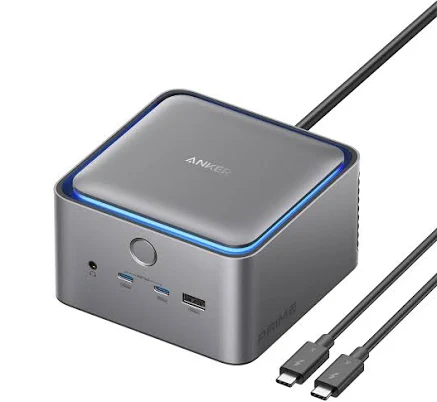
Anker Prime TB5 Docking Station
Best OverallPros
Cons
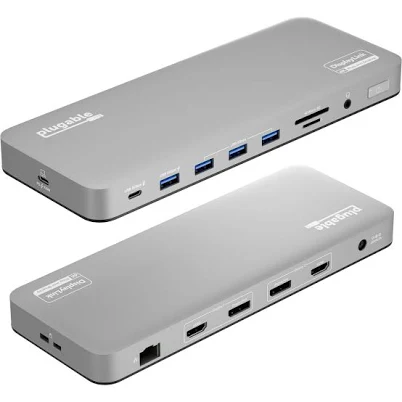
Plugable USB-C Dual 4K HDMI Docking Station
Best ValuePros
Cons
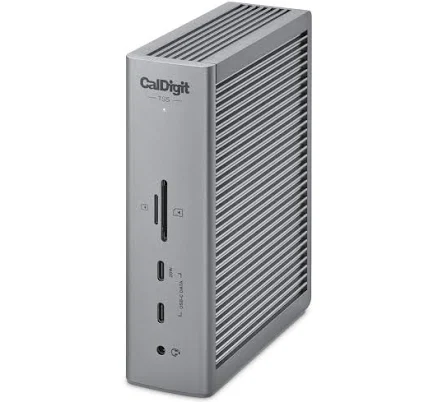
CalDigit TS5 Thunderbolt Dock
Best PremiumPros
Cons
Who Should Buy What
Anker Prime TB5 Docking Station
Best OverallBest for power users and professionals needing top-tier performance and future-proofing.
View in Comparison →Plugable USB-C Dual 4K HDMI Docking Station
Best ValueA dependable choice for users needing robust dual 4K output and wide compatibility.
View in Comparison →CalDigit TS5 Thunderbolt Dock
Best PremiumA premium dock ideal for creative professionals and Mac users seeking maximum connectivity.
View in Comparison →Who Should Buy What
Anker Prime TB5 Docking Station
Best OverallBest for power users and professionals needing top-tier performance and future-proofing.
View in Comparison →Plugable USB-C Dual 4K HDMI Docking Station
Best ValueA dependable choice for users needing robust dual 4K output and wide compatibility.
View in Comparison →CalDigit TS5 Thunderbolt Dock
Best PremiumA premium dock ideal for creative professionals and Mac users seeking maximum connectivity.
View in Comparison →