Quick Answer
Logitech MX Vertical Advanced Ergonomic Mouse
Top pick — The top pick for professionals with wrist strain concerns who want the most refined vertical ergonomic experience with multi-device flexibility.
See full comparison →Logitech Lift Vertical Ergonomic Mouse
Top pick — Ideal for office workers wanting a well-engineered vertical mouse from a trusted brand with long battery life.
See full comparison →Razer Pro Click V2 Gaming Mouse
Top pick — Best for power users and creatives who need top-tier sensor precision and marathon battery life and don't mind the premium price point.
See full comparison →At a Glance
| Product | Score | Price | Key Specs |
|---|---|---|---|
| JLab JBuds Ergonomic Mouse | 72 | Budget | connectivity: Wirelessdesign: Ergonomicbrand: JLab |
| EM11 NL Bluetooth Ergonomic Vertical Mouse | 61 | Budget | connectivity: Bluetoothdesign: Verticalbrand: EM11 |
| Wholesale Ergonomic Vertical Wireless Trackball Mouse | 58 | Budget | connectivity: Wirelessdesign: Vertical Trackballbrand: Generic |
| Logitech Lift Vertical Ergonomic Mouse | 82 | Budget | connectivity: Logi Bolt USB / Bluetoothdesign: Verticalbrand: Logitech |
| Acer Ergonomic Wireless Mouse | 60 | Budget | connectivity: Wireless (2.4GHz)design: Ergonomicbrand: Acer |
| Razer Pro Click V2 Gaming Mouse | 85 | Mid-range | connectivity: Wireless (2.4GHz) / Bluetoothdesign: Ergonomic (productivity-focused)brand: Razer |
| Logitech MX Vertical Advanced Ergonomic Mouse | 88 | Mid-range | connectivity: Logi Bolt USB / Bluetoothdesign: Vertical (57° angle)brand: Logitech |
| Uplift Desk Swell Vertical Ergonomic Mouse | 68 | Mid-range | connectivity: Wirelessdesign: Verticalbrand: Uplift Desk |
| Ergonomic Mouse | 55 | Budget | connectivity: Unspecifieddesign: Ergonomicbrand: Unspecified |
What to Look For
Hand Size Fit
Vertical grip mice come in small, medium, and large variants. A poor size match causes finger strain and reduces the posture benefit. Measure your hand length before buying and check manufacturer sizing guides.
Wired vs. Wireless Connectivity
Wireless models offer desk freedom and reduce cable drag, which matters in ergonomic setups. Wired options eliminate battery concerns and latency. Consider whether your workflow demands uninterrupted uptime or mobility.
DPI Range and Sensor Quality
A wider DPI range lets you tune cursor speed to your monitor setup and task type. Higher-grade optical sensors reduce jitter and improve tracking on varied surfaces. Minimum 800–4000 DPI covers most office and creative needs.
Button Customization
Programmable thumb buttons and scroll wheel tilt add workflow shortcuts without moving your hand. Look for software that allows per-app profiles. More buttons are only useful if placement suits your natural thumb resting position.
Silent vs. Standard Clicks
Silent switch models reduce click noise by up to 90 percent compared to standard mechanical switches. This is a meaningful factor in open offices or video calls. Silent switches have improved significantly in 2026 and no longer sacrifice tactile feedback noticeably.
How We Chose
We evaluated ergonomic mouse vertical grip options based on hand posture support, button customization, sensor precision, and connectivity flexibility. Priority was given to designs that genuinely reduce wrist pronation and suit extended daily use across office and creative workflows.
How We Chose
We evaluated ergonomic mouse vertical grip options based on hand posture support, button customization, sensor precision, and connectivity flexibility. Priority was given to designs that genuinely reduce wrist pronation and suit extended daily use across office and creative workflows.
Key Trade-offs
Vertical grip mice trade traditional lateral mouse movement for a handshake-style posture that reduces forearm strain. The tradeoff is an adjustment period of one to two weeks and occasionally reduced precision for fast lateral movements. Buyers must weigh comfort benefits against short-term productivity dips.
Key Trade-offs
Vertical grip mice trade traditional lateral mouse movement for a handshake-style posture that reduces forearm strain. The tradeoff is an adjustment period of one to two weeks and occasionally reduced precision for fast lateral movements. Buyers must weigh comfort benefits against short-term productivity dips.
What Matters Most
Focus on grip size match, DPI range, and whether the mouse supports wired or wireless use. Silent click switches matter for shared workspaces. Thumb button placement and scroll wheel tilt are often overlooked but significantly affect daily comfort and workflow efficiency.
What Matters Most
Focus on grip size match, DPI range, and whether the mouse supports wired or wireless use. Silent click switches matter for shared workspaces. Thumb button placement and scroll wheel tilt are often overlooked but significantly affect daily comfort and workflow efficiency.
Our Picks
Logitech MX Vertical Advanced Ergonomic Mouse
Best OverallPros
Cons

Logitech Lift Vertical Ergonomic Mouse
Best ValuePros
Cons
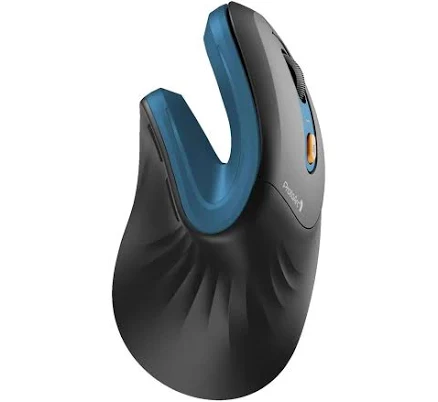
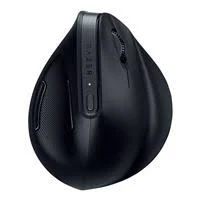
Razer Pro Click V2 Gaming Mouse
Best PremiumPros
Cons
Who Should Buy What
Logitech MX Vertical Advanced Ergonomic Mouse
Best OverallThe top pick for professionals with wrist strain concerns who want the most refined vertical ergonomic experience with multi-device flexibility.
View in Comparison →Logitech Lift Vertical Ergonomic Mouse
Best ValueIdeal for office workers wanting a well-engineered vertical mouse from a trusted brand with long battery life.
View in Comparison →Razer Pro Click V2 Gaming Mouse
Best PremiumBest for power users and creatives who need top-tier sensor precision and marathon battery life and don't mind the premium price point.
View in Comparison →Who Should Buy What
Logitech MX Vertical Advanced Ergonomic Mouse
Best OverallThe top pick for professionals with wrist strain concerns who want the most refined vertical ergonomic experience with multi-device flexibility.
View in Comparison →Logitech Lift Vertical Ergonomic Mouse
Best ValueIdeal for office workers wanting a well-engineered vertical mouse from a trusted brand with long battery life.
View in Comparison →Razer Pro Click V2 Gaming Mouse
Best PremiumBest for power users and creatives who need top-tier sensor precision and marathon battery life and don't mind the premium price point.
View in Comparison →