Quick Answer
Razer Laptop Cooling Pad
Top pick — Best for Razer ecosystem users or enthusiasts who want premium build quality, software integration, and aesthetics alongside solid cooling performance.
See full comparison →Enhance Gaming Laptop Cooling Pad Stand
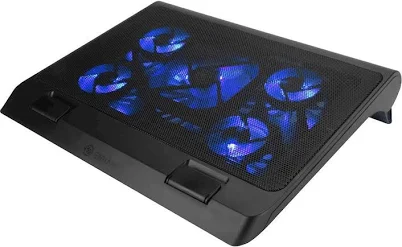
Top pick — Best for budget gamers who want a large, quiet fan with ergonomic height adjustment without a big outlay.
See full comparison →Iets GT500 Notebook Cooler
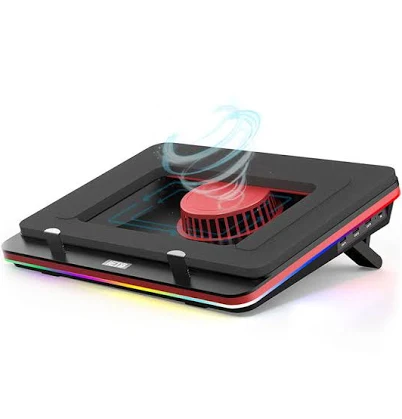
Top pick — Best for power users and gamers who need serious active cooling and ergonomic flexibility at a mid-range price.
See full comparison →At a Glance
| Product | Score | Price | Key Specs |
|---|---|---|---|
| Targus Lap Chill Mat AWE55US | 62 | Budget | fans: 2 x 100mmpower source: USB bus-poweredmax laptop size: 16 inches |
| Accessory Power Cryogen 5 Laptop Cooling Pad | 65 | Premium | fans: 5 fans (1 x 120mm center + 4 x 70mm corner)power source: USB bus-poweredmax laptop size: 17 inches |
| Allsop Sub-Zero Laptop Platform | 58 | Budget | fans: Passive (no fans)power source: None requiredmax laptop size: 17 inches |
| Enhance Gaming Laptop Cooling Pad Stand | 70 | Budget | fans: 1 x 200mm LED fanpower source: USB bus-poweredmax laptop size: 17 inches |
| Iets GT500 Notebook Cooler | 78 | Mid-range | fans: 2 x 140mm high-speed fanspower source: USB bus-poweredmax laptop size: 17 inches |
| Razer Laptop Cooling Pad | 84 | Budget | fans: 2 x 140mm PWM-controlled fanspower source: USB bus-poweredmax laptop size: 17 inches |
What to Look For
Fan Count & Airflow Layout
More fans don't always mean better cooling — placement matters more. Look for designs that align fans with your laptop's intake vents. A single large fan can outperform multiple small ones if positioned correctly.
Adjustable Height & Ergonomics
A laptop cooling pad stand that doubles as an ergonomic riser reduces neck strain during long sessions. Seek models with multiple tilt angles. Flat pads with no height adjustment offer cooling but miss the ergonomic benefit entirely.
Noise Level
Fan noise is a common complaint in this category. Pads with larger, slower-spinning fans tend to run quieter than those with many small high-RPM fans. Check decibel ratings before buying if you work in quiet environments.
USB Hub & Port Passthrough
Most cooling pads draw power from a USB port, effectively costing you one connection. Models with built-in USB hubs offset this loss. Confirm the hub supports your devices before assuming it replaces a dedicated hub.
Build Material & Portability
Mesh metal surfaces improve airflow and durability over solid plastic. If you travel frequently, prioritize lightweight foldable designs. Heavier all-metal builds offer longevity but add meaningful weight to a travel bag.
How We Chose
We evaluated laptop cooling pad stands based on thermal performance, build quality, noise output, ergonomic value, and port utility. Products that only addressed one of these factors ranked lower than well-rounded options that balance cooling efficiency with everyday usability.
How We Chose
We evaluated laptop cooling pad stands based on thermal performance, build quality, noise output, ergonomic value, and port utility. Products that only addressed one of these factors ranked lower than well-rounded options that balance cooling efficiency with everyday usability.
Key Trade-offs
The core tradeoff in this category is portability versus performance. Slim, travel-friendly pads sacrifice fan size and airflow capacity. Larger, more powerful units cool better but are impractical to carry. Budget options often skip adjustable height, forcing you to choose between cooling and ergonomics — a compromise worth avoiding if you use your laptop for more than two hours daily.
Key Trade-offs
The core tradeoff in this category is portability versus performance. Slim, travel-friendly pads sacrifice fan size and airflow capacity. Larger, more powerful units cool better but are impractical to carry. Budget options often skip adjustable height, forcing you to choose between cooling and ergonomics — a compromise worth avoiding if you use your laptop for more than two hours daily.
What Matters Most
Prioritize fan alignment with your specific laptop model's vent layout above all else. A well-aligned single-fan pad will outperform a misaligned multi-fan unit every time. After airflow, consider whether you need the stand for ergonomic positioning, since many buyers in 2026 are choosing dual-purpose cooling and riser designs to reduce desk clutter and improve posture simultaneously.
What Matters Most
Prioritize fan alignment with your specific laptop model's vent layout above all else. A well-aligned single-fan pad will outperform a misaligned multi-fan unit every time. After airflow, consider whether you need the stand for ergonomic positioning, since many buyers in 2026 are choosing dual-purpose cooling and riser designs to reduce desk clutter and improve posture simultaneously.
Our Picks
Razer Laptop Cooling Pad
Best OverallPros
Cons
Enhance Gaming Laptop Cooling Pad Stand
Best ValuePros
Cons
Iets GT500 Notebook Cooler
Best PremiumPros
Cons
Who Should Buy What
Razer Laptop Cooling Pad
Best OverallBest for Razer ecosystem users or enthusiasts who want premium build quality, software integration, and aesthetics alongside solid cooling performance.
View in Comparison →Enhance Gaming Laptop Cooling Pad Stand
Best ValueBest for budget gamers who want a large, quiet fan with ergonomic height adjustment without a big outlay.
View in Comparison →Iets GT500 Notebook Cooler
Best PremiumBest for power users and gamers who need serious active cooling and ergonomic flexibility at a mid-range price.
View in Comparison →Who Should Buy What
Razer Laptop Cooling Pad
Best OverallBest for Razer ecosystem users or enthusiasts who want premium build quality, software integration, and aesthetics alongside solid cooling performance.
View in Comparison →Enhance Gaming Laptop Cooling Pad Stand
Best ValueBest for budget gamers who want a large, quiet fan with ergonomic height adjustment without a big outlay.
View in Comparison →Iets GT500 Notebook Cooler
Best PremiumBest for power users and gamers who need serious active cooling and ergonomic flexibility at a mid-range price.
View in Comparison →