Quick Answer
BenQ ScreenBar Halo 2 Monitor Light
Top pick — The ultimate monitor light for discerning users prioritizing comfort and aesthetics.
See full comparison →Quntis 40cm Monitor Light Bar with Remote
Top pick — Great balance of features and price for mainstream users.
See full comparison →BenQ ScreenBar Halo Monitor Light
Top pick — A top pick for users prioritizing both performance and eye comfort.
See full comparison →At a Glance
| Product | Score | Price | Key Specs |
|---|---|---|---|
| Binepad ScreenLinear Monitor Light | 82 | Budget | length: 40cmcolor modes: 3mounting: Clip-on |
| Monster LED Duo Monitor Light Bars | 74 | Budget | length: 30cm x 2color modes: RGBmounting: Adhesive/clip |
| BenQ ScreenBar Pro Monitor Light | 91 | Mid-range | length: 45cmcolor temp: 2700-6500Kcontrol: Touch/Remote |
| Quntis 40cm Monitor Light Bar with Remote | 85 | Budget | length: 40cmcolor temp: 3000-6500Kcontrol: Wireless remote |
| BenQ ScreenBar Halo 2 Monitor Light | 94 | Mid-range | length: 50cmcolor temp: 2700-6500Kbacklight: Yes |
| Lukyamzn Monitor Light RGB Pro Backlight Bar | 86 | Mid-range | length: 45cmcolor modes: RGB + Whitebacklight: RGB |
| Mount-It! Monitor Light Bar | 79 | Budget | length: 40cmcolor temp: 3000-6500Kmounting: Clip-on |
| (3 pack) Monster LED Duo Monitor Light Bars with Smart Color Control & Razer Chroma Integration | 81 | Budget | length: 30cm x 6color modes: RGBintegration: Razer Chroma |
| BenQ ScreenBar Halo Monitor Light | 92 | Mid-range | length: 50cmcolor temp: 2700-6500Kbacklight: Yes |
| UPERFECT Monitor Light Bar Screen Lamp | 77 | Budget | length: 40cmcolor temp: 3000-6000Kmounting: Clip-on |
What to Look For
Color Temperature Flexibility
Look for a monitor light bar that covers a wide color temperature range. The ability to switch between warm and cool tones lets you match your lighting to your task and time of day, reducing eye fatigue during long sessions.
Mounting Clip Quality
The clip mechanism determines stability and monitor compatibility. Prioritize designs with soft rubber padding, adjustable clamping depth, and enough weight distribution to prevent the bar from tipping forward on thinner monitors.
Control Interface Options
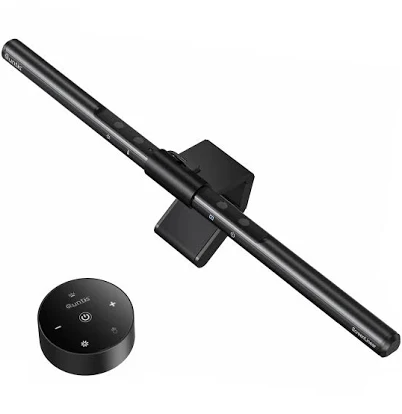
Monitor light bars come with touch controls on the bar itself, wired dials, or wireless remotes. A wireless remote or desk-mounted controller keeps adjustments effortless without reaching over your keyboard every time you want to change brightness.
Asymmetric Light Beam Design
The best monitor light bars use an asymmetric optical design that directs light downward onto your desk while preventing upward spill onto the screen. This is the core engineering feature that separates purpose-built monitor lights from repurposed desk lamps.
Ambient Rear Glow
Some premium bars include a rear-facing light that creates a soft halo on the wall behind your monitor. This bias lighting reduces eye strain by narrowing the brightness contrast between your screen and the surrounding environment, though it does add to the overall cost.
How We Chose
When evaluating the monitor light bar screen category, we focused on the factors that genuinely affect daily usability: the quality and evenness of light distribution, the range of color temperature adjustment, the brightness ceiling, and the control interface. We also considered how well each design accommodates different monitor thicknesses and whether the mounting mechanism feels secure without scratching bezels. Power delivery method matters too — USB-powered bars draw from your monitor's USB port or a wall adapter, and the cleanliness of that cable routing affects your overall desk aesthetic. Finally, we looked at whether ambient or backlight features add real value or simply inflate the price without meaningful benefit to eye comfort.
How We Chose
When evaluating the monitor light bar screen category, we focused on the factors that genuinely affect daily usability: the quality and evenness of light distribution, the range of color temperature adjustment, the brightness ceiling, and the control interface. We also considered how well each design accommodates different monitor thicknesses and whether the mounting mechanism feels secure without scratching bezels. Power delivery method matters too — USB-powered bars draw from your monitor's USB port or a wall adapter, and the cleanliness of that cable routing affects your overall desk aesthetic. Finally, we looked at whether ambient or backlight features add real value or simply inflate the price without meaningful benefit to eye comfort.
Key Trade-offs
The biggest tradeoff in this category is between simplicity and feature depth. Entry-level monitor light bars offer basic on/off and brightness control, which is perfectly adequate for most users. Mid-range options add color temperature adjustment, letting you shift between a cool daylight tone for focused work and a warm amber tone for evening use — a genuinely useful feature that reduces eye strain over long sessions. Premium models layer on auto-dimming sensors, touch controls, wireless remotes, and even rear ambient glow that bathes the wall behind your monitor in soft light. That rear glow can reduce the perceived contrast between a bright screen and a dark room, which some users find helpful, but it also adds cost and complexity. Consider honestly how many features you will actually use before paying a premium for them. Another tradeoff is size: longer bars spread light more evenly across a wide desk surface, but they may overhang narrower monitors and look awkward. Always match bar length to your monitor width.
Key Trade-offs
The biggest tradeoff in this category is between simplicity and feature depth. Entry-level monitor light bars offer basic on/off and brightness control, which is perfectly adequate for most users. Mid-range options add color temperature adjustment, letting you shift between a cool daylight tone for focused work and a warm amber tone for evening use — a genuinely useful feature that reduces eye strain over long sessions. Premium models layer on auto-dimming sensors, touch controls, wireless remotes, and even rear ambient glow that bathes the wall behind your monitor in soft light. That rear glow can reduce the perceived contrast between a bright screen and a dark room, which some users find helpful, but it also adds cost and complexity. Consider honestly how many features you will actually use before paying a premium for them. Another tradeoff is size: longer bars spread light more evenly across a wide desk surface, but they may overhang narrower monitors and look awkward. Always match bar length to your monitor width.
What Matters Most
For most buyers shopping for a monitor light bar screen in 2026, color temperature range and smooth dimming are the two features worth prioritizing above all else. A bar that can shift from roughly 2700K warm white to 6500K cool daylight covers virtually every working scenario. Smooth, stepless dimming — rather than a few fixed brightness levels — lets you dial in exactly the right amount of light for your environment. Beyond light quality, the mounting clip design deserves close attention. A well-engineered clip grips the monitor firmly without wobble, accommodates both thin and thick bezels, and uses soft padding to prevent scratches. USB-C power input is increasingly standard and worth seeking out for compatibility with modern setups. If you frequently work in the evenings or in a room with variable natural light, an integrated auto-brightness sensor that adjusts output based on ambient conditions is a genuinely useful upgrade rather than a gimmick.
What Matters Most
For most buyers shopping for a monitor light bar screen in 2026, color temperature range and smooth dimming are the two features worth prioritizing above all else. A bar that can shift from roughly 2700K warm white to 6500K cool daylight covers virtually every working scenario. Smooth, stepless dimming — rather than a few fixed brightness levels — lets you dial in exactly the right amount of light for your environment. Beyond light quality, the mounting clip design deserves close attention. A well-engineered clip grips the monitor firmly without wobble, accommodates both thin and thick bezels, and uses soft padding to prevent scratches. USB-C power input is increasingly standard and worth seeking out for compatibility with modern setups. If you frequently work in the evenings or in a room with variable natural light, an integrated auto-brightness sensor that adjusts output based on ambient conditions is a genuinely useful upgrade rather than a gimmick.
Our Picks
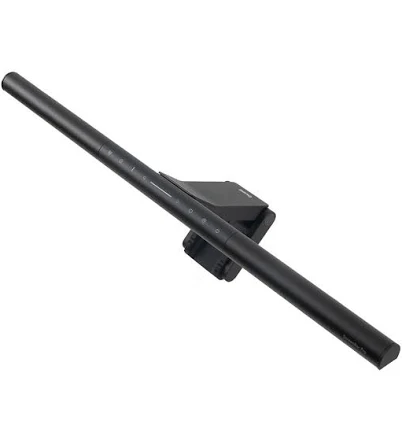
BenQ ScreenBar Halo 2 Monitor Light
Best OverallPros
Cons
Quntis 40cm Monitor Light Bar with Remote
Best ValuePros
Cons
BenQ ScreenBar Halo Monitor Light
Best PremiumPros
Cons
Who Should Buy What
BenQ ScreenBar Halo 2 Monitor Light
Best OverallThe ultimate monitor light for discerning users prioritizing comfort and aesthetics.
View in Comparison →Quntis 40cm Monitor Light Bar with Remote
Best ValueGreat balance of features and price for mainstream users.
View in Comparison →BenQ ScreenBar Halo Monitor Light
Best PremiumA top pick for users prioritizing both performance and eye comfort.
View in Comparison →Who Should Buy What
BenQ ScreenBar Halo 2 Monitor Light
Best OverallThe ultimate monitor light for discerning users prioritizing comfort and aesthetics.
View in Comparison →Quntis 40cm Monitor Light Bar with Remote
Best ValueGreat balance of features and price for mainstream users.
View in Comparison →BenQ ScreenBar Halo Monitor Light
Best PremiumA top pick for users prioritizing both performance and eye comfort.
View in Comparison →