Quick Answer
BenQ ScreenBar Halo 2 Monitor Light
Top pick — The ultimate monitor light for discerning users prioritizing comfort and aesthetics.
See full comparison →Quntis 40cm Monitor Light Bar with Remote
Top pick — Great balance of features and price for mainstream users.
See full comparison →BenQ ScreenBar Halo Monitor Light
Top pick — A top pick for users prioritizing both performance and eye comfort.
See full comparison →At a Glance
| Product | Score | Price | Key Specs |
|---|---|---|---|
| Binepad ScreenLinear Monitor Light | 82 | Budget | length: 40cmcolor modes: 3mounting: Clip-on |
| Monster LED Duo Monitor Light Bars | 74 | Budget | length: 30cm x 2color modes: RGBmounting: Adhesive/clip |
| BenQ ScreenBar Pro Monitor Light | 91 | Mid-range | length: 45cmcolor temp: 2700-6500Kcontrol: Touch/Remote |
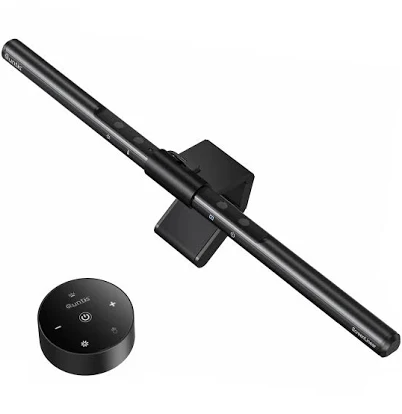
| Quntis 40cm Monitor Light Bar with Remote | 85 | Budget | length: 40cmcolor temp: 3000-6500Kcontrol: Wireless remote |
| BenQ ScreenBar Halo 2 Monitor Light | 94 | Mid-range | length: 50cmcolor temp: 2700-6500Kbacklight: Yes |
| Lukyamzn Monitor Light RGB Pro Backlight Bar | 86 | Mid-range | length: 45cmcolor modes: RGB + Whitebacklight: RGB |
| Mount-It! Monitor Light Bar | 79 | Budget | length: 40cmcolor temp: 3000-6500Kmounting: Clip-on |
| (3 pack) Monster LED Duo Monitor Light Bars with Smart Color Control & Razer Chroma Integration | 81 | Budget | length: 30cm x 6color modes: RGBintegration: Razer Chroma |
What to Look For
Asymmetric Optical Design
The defining feature of a quality monitor light bar screen is its asymmetric lens, which bends light downward onto your workspace rather than forward into your eyes or backward onto the screen. This engineering detail is what separates a dedicated monitor light from simply placing a desk lamp nearby.
Color Temperature Flexibility
Models offering adjustable color temperature let you shift between warm amber tones for relaxed evening sessions and crisp cool-white light for focused daytime work. This flexibility supports natural energy rhythms and reduces the visual fatigue that comes from mismatched ambient and screen lighting.
Mounting Compatibility
Before buying, confirm that the mounting clip suits your specific monitor type. Ultra-thin bezels, curved ultrawide panels, and monitors with built-in cameras all present unique challenges. A well-designed counterweight system accommodates a broader range of monitor thicknesses without scratching or stressing the display housing.
Control Interface Options
Touch-sensitive controls built into the bar offer a clean look and quick access to brightness and color temperature. Wireless remotes add convenience for users who frequently adjust their lighting, while basic rotary dials provide tactile, reliable control without any learning curve.
USB Power Convenience
Drawing power from a monitor's built-in USB hub keeps cable clutter minimal and means the light turns on and off automatically with your workstation. Verify port availability on your specific monitor model to ensure a truly seamless installation experience.
How We Chose
When evaluating the monitor light bar screen category, we focused on the features that genuinely improve daily working conditions rather than flashy specifications that rarely translate into real-world benefits. We examined how different designs handle the core challenge of illuminating a desk surface without creating glare or reflections on the display itself. The best monitor light bar screen options use an asymmetric optical design that directs light downward onto your keyboard and documents while keeping the screen surface completely free from hotspots. We also considered build quality, since a light bar that clips onto your monitor needs to stay firmly in place without wobbling or scratching the display bezel. Ease of use matters enormously here, because a workspace accessory that requires fiddling with settings defeats the purpose of a streamlined setup. Finally, we looked at how well each design category adapts to different monitor thicknesses and curved screen profiles, since modern workstations vary widely in their hardware configurations.
How We Chose
When evaluating the monitor light bar screen category, we focused on the features that genuinely improve daily working conditions rather than flashy specifications that rarely translate into real-world benefits. We examined how different designs handle the core challenge of illuminating a desk surface without creating glare or reflections on the display itself. The best monitor light bar screen options use an asymmetric optical design that directs light downward onto your keyboard and documents while keeping the screen surface completely free from hotspots. We also considered build quality, since a light bar that clips onto your monitor needs to stay firmly in place without wobbling or scratching the display bezel. Ease of use matters enormously here, because a workspace accessory that requires fiddling with settings defeats the purpose of a streamlined setup. Finally, we looked at how well each design category adapts to different monitor thicknesses and curved screen profiles, since modern workstations vary widely in their hardware configurations.
Key Trade-offs
The most important tradeoff in the monitor light bar screen category is between simplicity and control. Entry-level models typically offer a single brightness level or a basic dial, which is perfectly adequate for users who set their lighting once and forget about it. Mid-range options introduce touch controls on the bar itself, allowing quick adjustments without reaching for a separate device. Premium designs add wireless remotes or app connectivity, which sounds appealing but adds complexity and potential points of failure. A second major tradeoff involves the halo or backlight feature found on higher-end models. A rear-facing ambient light reduces eye strain by softening the contrast between a bright screen and a dark room, but it adds bulk, weight, and cost. If your monitor sits close to a wall, the ambient glow may not even be visible, making the premium largely wasted. Color temperature range is another consideration. Models that shift between warm and cool tones give you flexibility to match your lighting to the time of day or task at hand, supporting healthier circadian rhythms during long work sessions. However, if you work in a consistently lit office environment, a fixed neutral white output may be entirely sufficient and simpler to manage.
Key Trade-offs
The most important tradeoff in the monitor light bar screen category is between simplicity and control. Entry-level models typically offer a single brightness level or a basic dial, which is perfectly adequate for users who set their lighting once and forget about it. Mid-range options introduce touch controls on the bar itself, allowing quick adjustments without reaching for a separate device. Premium designs add wireless remotes or app connectivity, which sounds appealing but adds complexity and potential points of failure. A second major tradeoff involves the halo or backlight feature found on higher-end models. A rear-facing ambient light reduces eye strain by softening the contrast between a bright screen and a dark room, but it adds bulk, weight, and cost. If your monitor sits close to a wall, the ambient glow may not even be visible, making the premium largely wasted. Color temperature range is another consideration. Models that shift between warm and cool tones give you flexibility to match your lighting to the time of day or task at hand, supporting healthier circadian rhythms during long work sessions. However, if you work in a consistently lit office environment, a fixed neutral white output may be entirely sufficient and simpler to manage.
What Matters Most
The single most important factor when choosing a monitor light bar screen is the optical quality of the light distribution. A poorly designed unit creates uneven pools of brightness on your desk, with hot spots directly beneath the bar and dim edges toward the sides. Look for products that advertise uniform illumination across the full beam width, ideally covering at least a standard desk width without harsh gradients. The mounting mechanism deserves careful attention as well. Most monitor light bars use a weighted clip that hooks over the top bezel, relying on gravity to stay in position. This works well for standard flat monitors but can be unreliable on ultra-thin bezels or heavily curved ultrawide screens. Some designs include an adjustable counterweight or a secondary grip to accommodate a wider range of monitor profiles. Power delivery is a practical concern that buyers often overlook. Nearly all monitor light bars draw power through a USB-A or USB-C connection, which is convenient but means your monitor or a nearby hub needs an available port. Check whether your monitor has a downstream USB port before purchasing, since running a separate cable to a wall adapter can undermine the clean aesthetic most buyers are seeking. Finally, consider the color rendering index of the light source. A higher CRI value means colors appear more accurate and natural under the light, which matters significantly for designers, photographers, and anyone doing color-sensitive work at their desk.
What Matters Most
The single most important factor when choosing a monitor light bar screen is the optical quality of the light distribution. A poorly designed unit creates uneven pools of brightness on your desk, with hot spots directly beneath the bar and dim edges toward the sides. Look for products that advertise uniform illumination across the full beam width, ideally covering at least a standard desk width without harsh gradients. The mounting mechanism deserves careful attention as well. Most monitor light bars use a weighted clip that hooks over the top bezel, relying on gravity to stay in position. This works well for standard flat monitors but can be unreliable on ultra-thin bezels or heavily curved ultrawide screens. Some designs include an adjustable counterweight or a secondary grip to accommodate a wider range of monitor profiles. Power delivery is a practical concern that buyers often overlook. Nearly all monitor light bars draw power through a USB-A or USB-C connection, which is convenient but means your monitor or a nearby hub needs an available port. Check whether your monitor has a downstream USB port before purchasing, since running a separate cable to a wall adapter can undermine the clean aesthetic most buyers are seeking. Finally, consider the color rendering index of the light source. A higher CRI value means colors appear more accurate and natural under the light, which matters significantly for designers, photographers, and anyone doing color-sensitive work at their desk.
Our Picks
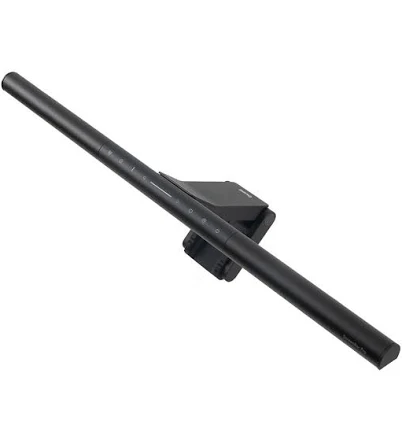
BenQ ScreenBar Halo 2 Monitor Light
Best OverallPros
Cons
Quntis 40cm Monitor Light Bar with Remote
Best ValuePros
Cons
BenQ ScreenBar Halo Monitor Light
Best PremiumPros
Cons
Who Should Buy What
BenQ ScreenBar Halo 2 Monitor Light
Best OverallThe ultimate monitor light for discerning users prioritizing comfort and aesthetics.
View in Comparison →Quntis 40cm Monitor Light Bar with Remote
Best ValueGreat balance of features and price for mainstream users.
View in Comparison →BenQ ScreenBar Halo Monitor Light
Best PremiumA top pick for users prioritizing both performance and eye comfort.
View in Comparison →Who Should Buy What
BenQ ScreenBar Halo 2 Monitor Light
Best OverallThe ultimate monitor light for discerning users prioritizing comfort and aesthetics.
View in Comparison →Quntis 40cm Monitor Light Bar with Remote
Best ValueGreat balance of features and price for mainstream users.
View in Comparison →BenQ ScreenBar Halo Monitor Light
Best PremiumA top pick for users prioritizing both performance and eye comfort.
View in Comparison →