Quick Answer
Logitech MX Vertical Advanced Ergonomic Mouse
Top pick — Best for power users and multi-device professionals who need class-leading ergonomics, precision, and seamless device switching.
See full comparison →Logitech Lift Vertical Ergonomic Mouse
Top pick — Best for office workers who want a quiet, reliable daily driver with long battery life and solid Logitech build quality.
See full comparison →JLab JBuds Ergonomic Wireless Vertical Mouse
Top pick — Best for budget-conscious users making their first switch to a vertical mouse without committing to a premium price point.
See full comparison →At a Glance
| Product | Score | Price | Key Specs |
|---|---|---|---|
| JLab JBuds Ergonomic Wireless Vertical Mouse | 72 | Budget | connectivity: Wireless (USB dongle)form factor: Vertical ergonomicbrand: JLab |
| Logitech Lift Vertical Ergonomic Mouse | 82 | Budget | connectivity: Logi Bolt USB / Bluetoothbattery life: Up to 24 months (AA)dpi: 400–4000 DPI |
| Ergonomic Mouse | 65 | Budget | connectivity: Wirelessform factor: Ergonomic verticalbrand: Unspecified |
| Delton S12 Wireless Ergonomic Vertical Mouse | 68 | Budget | connectivity: Wireless (USB dongle)form factor: Vertical ergonomicbrand: Delton |
| Logitech MX Vertical Advanced Ergonomic Mouse | 90 | Mid-range | connectivity: Logi Bolt USB / Bluetoothbattery life: 4 months per chargedpi: 400–4000 DPI |
What to Look For
Vertical Grip Angle
A true vertical or near-vertical design rotates the forearm into a neutral handshake position, reducing pronation strain. This is the core benefit of ergonomic wireless mice. Look for a grip angle between 50 and 70 degrees for the best balance of comfort and control.
Hand Size Compatibility
Ergonomic mice are not one-size-fits-all. Most manufacturers offer small and large variants. Measure your hand from wrist to middle fingertip and match it to published product dimensions before buying. A poor size fit negates all ergonomic benefits.
Wireless Connectivity Options
Dual-mode mice support both a USB receiver and Bluetooth, letting you switch between devices. USB dongles typically offer lower latency, while Bluetooth avoids occupying a USB port. For office use, either works well — gamers or precision users should prefer the dongle option.
Battery Life and Charging
Rechargeable mice via USB-C are now the standard in 2026 and are preferable to AA battery models for convenience. Look for at least three months of typical use per charge. Some models offer fast-charge features that provide hours of use from a short plug-in session.
DPI Range and Customization
Adjustable DPI lets you tune cursor speed to your workflow and screen resolution. Ergonomic mice typically range from 400 to 4000 DPI, which covers all office and creative tasks. A dedicated DPI button for on-the-fly switching is a useful feature if you alternate between tasks.
How We Chose
We focused on wireless mouse ergonomic design options that prioritize hand posture, connectivity reliability, and comfort during extended use. Key criteria included vertical or sculpted grip angles, adjustable DPI, multi-device pairing, and battery life. We weighted real-world comfort over raw spec sheets.
How We Chose
We focused on wireless mouse ergonomic design options that prioritize hand posture, connectivity reliability, and comfort during extended use. Key criteria included vertical or sculpted grip angles, adjustable DPI, multi-device pairing, and battery life. We weighted real-world comfort over raw spec sheets.
Key Trade-offs
Vertical designs reduce forearm pronation but require an adjustment period of one to two weeks. Compact ergonomic mice travel well but may sacrifice wrist support. Heavier mice with premium builds often outlast budget options, but lighter models reduce fatigue during long sessions. Battery life and charging method are often overlooked dealbreakers.
Key Trade-offs
Vertical designs reduce forearm pronation but require an adjustment period of one to two weeks. Compact ergonomic mice travel well but may sacrifice wrist support. Heavier mice with premium builds often outlast budget options, but lighter models reduce fatigue during long sessions. Battery life and charging method are often overlooked dealbreakers.
What Matters Most
For most buyers, grip angle and hand size compatibility matter more than any single feature. Confirm the mouse fits your hand measurement before purchasing — most brands publish dimensions. Wireless connectivity type affects latency and range, so consider whether you need a USB dongle, Bluetooth, or both. Prioritize adjustable click tension if you have joint sensitivity.
What Matters Most
For most buyers, grip angle and hand size compatibility matter more than any single feature. Confirm the mouse fits your hand measurement before purchasing — most brands publish dimensions. Wireless connectivity type affects latency and range, so consider whether you need a USB dongle, Bluetooth, or both. Prioritize adjustable click tension if you have joint sensitivity.
Our Picks
Logitech MX Vertical Advanced Ergonomic Mouse
Best OverallPros
Cons

Logitech Lift Vertical Ergonomic Mouse
Best ValuePros
Cons
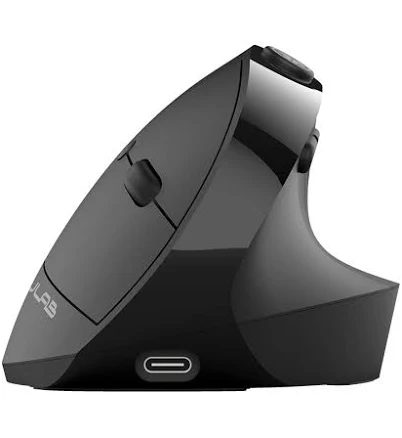
JLab JBuds Ergonomic Wireless Vertical Mouse
Best PremiumPros
Cons
Who Should Buy What
Logitech MX Vertical Advanced Ergonomic Mouse
Best OverallBest for power users and multi-device professionals who need class-leading ergonomics, precision, and seamless device switching.
View in Comparison →Logitech Lift Vertical Ergonomic Mouse
Best ValueBest for office workers who want a quiet, reliable daily driver with long battery life and solid Logitech build quality.
View in Comparison →JLab JBuds Ergonomic Wireless Vertical Mouse
Best PremiumBest for budget-conscious users making their first switch to a vertical mouse without committing to a premium price point.
View in Comparison →Who Should Buy What
Logitech MX Vertical Advanced Ergonomic Mouse
Best OverallBest for power users and multi-device professionals who need class-leading ergonomics, precision, and seamless device switching.
View in Comparison →Logitech Lift Vertical Ergonomic Mouse
Best ValueBest for office workers who want a quiet, reliable daily driver with long battery life and solid Logitech build quality.
View in Comparison →JLab JBuds Ergonomic Wireless Vertical Mouse
Best PremiumBest for budget-conscious users making their first switch to a vertical mouse without committing to a premium price point.
View in Comparison →