Quick Answer
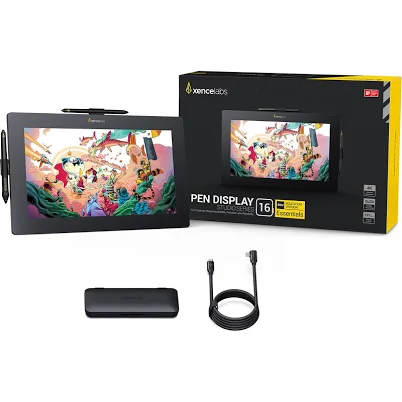
Xencelabs Pen Display 16
Top pick — Best for professional artists and colorists who demand top-tier display accuracy and resolution and can justify the premium price point.
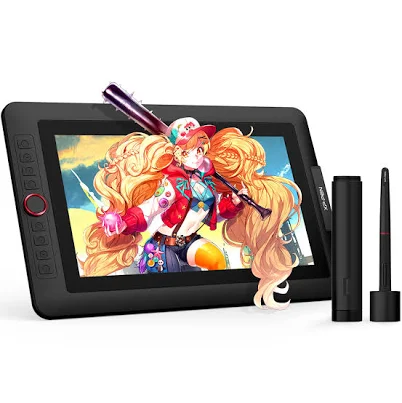
See full comparison →XPPen Artist 13.3 Pro V2 Pen Display
Top pick — Best for serious hobbyists and semi-professional artists who want near-pro specs at a mid-range price without going full premium.
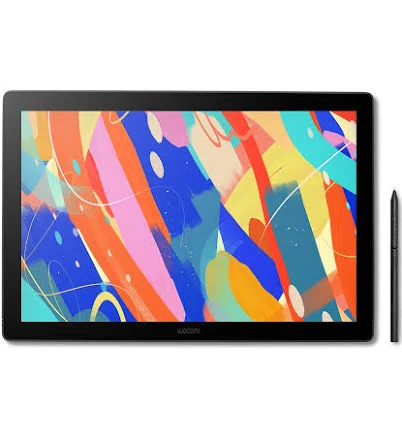
See full comparison →Wacom Cintiq 16
Top pick — Best for professional illustrators and designers who trust Wacom's ecosystem and need a large, reliable workspace.
See full comparison →At a Glance
| Product | Score | Price | Key Specs |
|---|---|---|---|
| XP-Pen Artist 13.3 Pro Pen Display | 80 | Premium | screen size: 13.3 inchesresolution: 1920x1080 FHDpen pressure: 8192 levels |
| Huion Kamvas 13 | 78 | Premium | screen size: 13.6 inchesresolution: 1920x1080 FHDpen pressure: 8192 levels |
| XP-Pen Artist 12 (2nd Gen) | 74 | Premium | screen size: 11.9 inchesresolution: 1920x1080 FHDpen pressure: 8192 levels |
| Wacom Movink 13 OLED | 91 | High-end | screen size: 13.3 inchesresolution: 1920x1080 FHD OLEDpen pressure: 8192 levels |
| XP-Pen Deco 640 Drawing Tablet | 65 | Premium | screen size: Screenlessactive area: 6 x 4 inchespen pressure: 8192 levels |
| Wacom Cintiq 16 | 88 | High-end | screen size: 15.6 inchesresolution: 1920x1080 FHDpen pressure: 8192 levels |
| Xencelabs Pen Display 16 | 93 | High-end | screen size: 15.6 inchesresolution: 2560x1440 QHDpen pressure: 8192 levels |
| XPPen Artist 13.3 Pro V2 Pen Display | 83 | Premium | screen size: 13.3 inchesresolution: 2560x1440 QHDpen pressure: 16384 levels |
What to Look For
Pen Technology
Look for battery-free stylus designs with high pressure levels and tilt recognition. These eliminate charging interruptions and deliver more natural stroke variation. Pen nib friction and replaceable tip options also affect long-term drawing comfort.
Display Color Accuracy
A wide color gamut and factory calibration are essential for professional color work. Check whether the display covers sRGB and DCI-P3 standards relevant to your workflow. Factory-calibrated units reduce the time and cost of manual profiling.
Parallax and Glass Stack
Fully laminated displays minimize the gap between the glass surface and the screen, reducing parallax — the visual offset between pen tip and cursor. This is critical for precise linework and detail illustration at any zoom level.
Connectivity and Compatibility
Single-cable USB-C connections simplify setup and reduce desk clutter. Confirm compatibility with your operating system and creative software before purchasing. Driver update frequency is a reliable indicator of long-term manufacturer support.
Ergonomics and Stand Design
Adjustable stand angles reduce wrist and neck strain during long sessions. Some displays include built-in stands while others require separate purchases. Consider whether the unit supports VESA mounting if you use an articulating arm.
How We Chose
We evaluated digital drawing tablet pen display options based on the factors that most directly affect daily creative work: pen accuracy, display color fidelity, parallax reduction, and driver stability. Displays that consistently delivered low pen latency, wide color gamut coverage, and reliable software support across major creative applications ranked highest in our assessment.
How We Chose
We evaluated digital drawing tablet pen display options based on the factors that most directly affect daily creative work: pen accuracy, display color fidelity, parallax reduction, and driver stability. Displays that consistently delivered low pen latency, wide color gamut coverage, and reliable software support across major creative applications ranked highest in our assessment.
Key Trade-offs
The core tradeoff in this category is screen size versus desk footprint and portability. Larger displays offer more drawing real estate but demand more space and typically cost more. Smaller displays are easier to travel with but can feel cramped for detailed illustration work. Color accuracy versus price is another tension — professional-grade gamut coverage often pushes units into a higher budget tier.
Key Trade-offs
The core tradeoff in this category is screen size versus desk footprint and portability. Larger displays offer more drawing real estate but demand more space and typically cost more. Smaller displays are easier to travel with but can feel cramped for detailed illustration work. Color accuracy versus price is another tension — professional-grade gamut coverage often pushes units into a higher budget tier.
What Matters Most
Prioritize pen pressure levels and tilt sensitivity if you work in illustration or concept art, as these directly affect stroke expressiveness. For photo editing or print work, focus on color gamut coverage and factory calibration quality. Connection simplicity — ideally a single-cable setup — matters most for artists who frequently move between workstations or work in hybrid studio environments in 2026.
What Matters Most
Prioritize pen pressure levels and tilt sensitivity if you work in illustration or concept art, as these directly affect stroke expressiveness. For photo editing or print work, focus on color gamut coverage and factory calibration quality. Connection simplicity — ideally a single-cable setup — matters most for artists who frequently move between workstations or work in hybrid studio environments in 2026.
Our Picks
Xencelabs Pen Display 16
Best OverallPros
Cons
XPPen Artist 13.3 Pro V2 Pen Display
Best ValuePros
Cons
Wacom Cintiq 16
Best PremiumPros
Cons
Who Should Buy What
Xencelabs Pen Display 16
Best OverallBest for professional artists and colorists who demand top-tier display accuracy and resolution and can justify the premium price point.
View in Comparison →XPPen Artist 13.3 Pro V2 Pen Display
Best ValueBest for serious hobbyists and semi-professional artists who want near-pro specs at a mid-range price without going full premium.
View in Comparison →Wacom Cintiq 16
Best PremiumBest for professional illustrators and designers who trust Wacom's ecosystem and need a large, reliable workspace.
View in Comparison →Who Should Buy What
Xencelabs Pen Display 16
Best OverallBest for professional artists and colorists who demand top-tier display accuracy and resolution and can justify the premium price point.
View in Comparison →XPPen Artist 13.3 Pro V2 Pen Display
Best ValueBest for serious hobbyists and semi-professional artists who want near-pro specs at a mid-range price without going full premium.
View in Comparison →Wacom Cintiq 16
Best PremiumBest for professional illustrators and designers who trust Wacom's ecosystem and need a large, reliable workspace.
View in Comparison →