Best Drawing Tablet Displays 2026: Top Pen Displays & Graphics Tablets Compared
8 models compared · Updated 29 Mar 2026
Specs Comparison
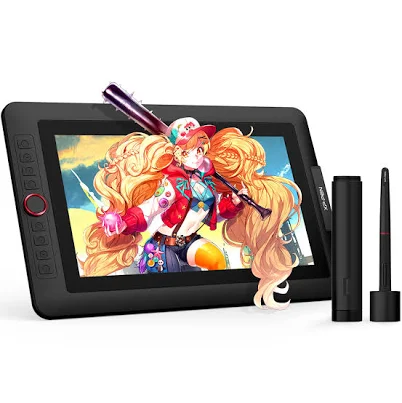
XP-Pen Artist 13.3 Pro Pen DisplayXP-Pen Official Store | US$195.99
overall score
80
price$195.99
screen size13.3 inches
resolution1920x1080 FHD
pen pressure8192 levels
color gamut88% Adobe RGB
tilt support±60°
express keys8 keys + dial
use case—
weight—
connectivity—
active area—
type—
pen model—
extras—
View Verdict ↓
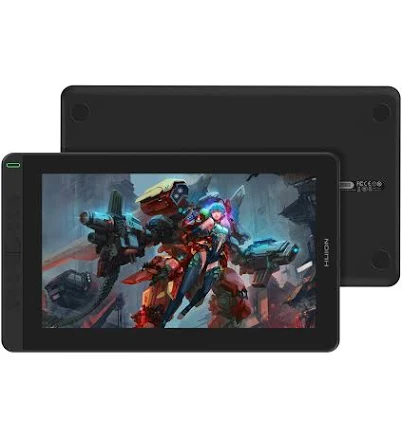
Huion Kamvas 13Huion Official Store$179.00
overall score
78
price$179.00
screen size13.6 inches
resolution1920x1080 FHD
pen pressure8192 levels
color gamut120% sRGB
tilt support±60°
express keys6 keys
use case—
weight—
connectivity—
active area—
type—
pen model—
extras—
View Verdict ↓
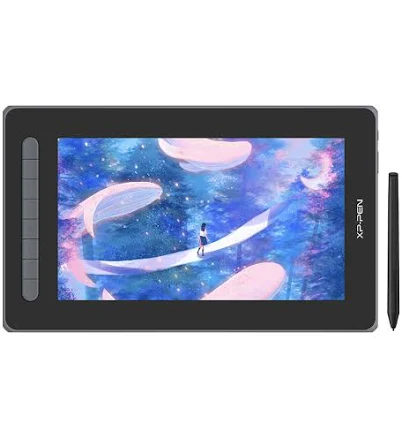
XP-Pen Artist 12 (2nd Gen)XP-Pen Official Store | US$174.99
overall score
74
price$174.99
screen size11.9 inches
resolution1920x1080 FHD
pen pressure8192 levels
color gamut88% Adobe RGB
tilt support±60°
express keys—
use caseArt, Animation, Design
weight—
connectivity—
active area—
type—
pen model—
extras—
View Verdict ↓
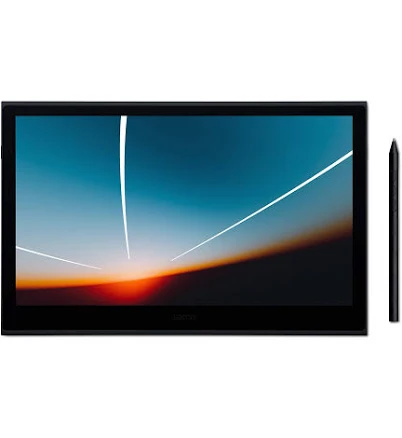
Wacom Movink 13 OLEDBest Buy$599.95
overall score
91
price$599.95
screen size13.3 inches
resolution1920x1080 FHD OLED
pen pressure8192 levels
color gamut100% DCI-P3
tilt support—
express keys—
use case—
weight420g
connectivityUSB-C
active area—
type—
pen model—
extras—
View Verdict ↓
XP-Pen Deco 640 Drawing TabletXP-Pen Official Store | US$195.99
overall score
65
price$195.99
screen sizeScreenless
resolution—
pen pressure8192 levels
color gamut—
tilt support—
express keys—
use case—
weight—
connectivityUSB
active area6 x 4 inches
typePen tablet (no display)
pen model—
extras—
View Verdict ↓
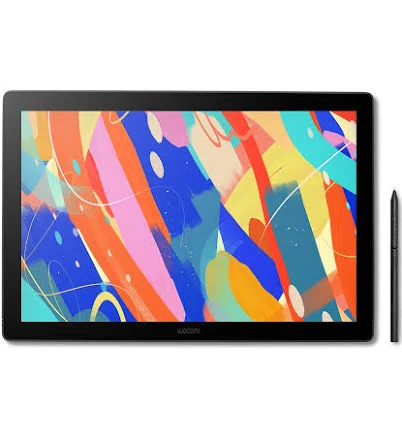
Wacom Cintiq 16
Best Premium
Best Buy$699.95overall score
88
price$699.95
screen size15.6 inches
resolution1920x1080 FHD
pen pressure8192 levels
color gamut96% sRGB / 72% Adobe RGB
tilt support±60°
express keys—
use case—
weight—
connectivity—
active area—
type—
pen modelWacom Pro Pen 2
extras—
View Verdict ↓
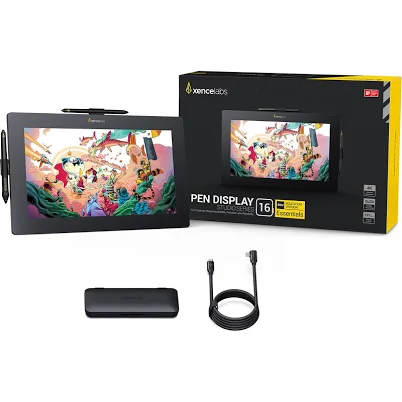
Xencelabs Pen Display 16
Best Overall
B&H Photo-Video-Audio$799.00overall score
93
price$799.00
screen size15.6 inches
resolution2560x1440 QHD
pen pressure8192 levels
color gamut99% Adobe RGB / 95% DCI-P3
tilt support±60°
express keys—
use case—
weight—
connectivity—
active area—
type—
pen model—
extrasQuick Keys remote included
View Verdict ↓
XPPen Artist 13.3 Pro V2 Pen Display
Best Value
XP-Pen Official Store | US$195.99overall score
83
price$195.99
screen size13.3 inches
resolution2560x1440 QHD
pen pressure16384 levels
color gamut92% Adobe RGB
tilt support±60°
express keys8 keys + dial
use case—
weight—
connectivity—
active area—
type—
pen model—
extras—
View Verdict ↓
| Spec | XP-Pen Artist 13.3 Pro Pen DisplayXP-Pen Official Store | US$195.99 | Huion Kamvas 13Huion Official Store$179.00 | XP-Pen Artist 12 (2nd Gen)XP-Pen Official Store | US$174.99 | Wacom Movink 13 OLEDBest Buy$599.95 | XP-Pen Deco 640 Drawing TabletXP-Pen Official Store | US$195.99 | Wacom Cintiq 16 Best Premium Best Buy$699.95 | Xencelabs Pen Display 16 Best Overall B&H Photo-Video-Audio$799.00 | XPPen Artist 13.3 Pro V2 Pen Display Best Value XP-Pen Official Store | US$195.99 |
|---|---|---|---|---|---|---|---|---|
| overall score | 80 | 78 | 74 | 91 | 65 | 88 | 93 | 83 |
| price | $195.99 | $179.00 | $174.99 | $599.95 | $195.99 | $699.95 | $799.00 | $195.99 |
| screen size | 13.3 inches | 13.6 inches | 11.9 inches | 13.3 inches | Screenless | 15.6 inches | 15.6 inches | 13.3 inches |
| resolution | 1920x1080 FHD | 1920x1080 FHD | 1920x1080 FHD | 1920x1080 FHD OLED | — | 1920x1080 FHD | 2560x1440 QHD | 2560x1440 QHD |
| pen pressure | 8192 levels | 8192 levels | 8192 levels | 8192 levels | 8192 levels | 8192 levels | 8192 levels | 16384 levels |
| color gamut | 88% Adobe RGB | 120% sRGB | 88% Adobe RGB | 100% DCI-P3 | — | 96% sRGB / 72% Adobe RGB | 99% Adobe RGB / 95% DCI-P3 | 92% Adobe RGB |
| tilt support | ±60° | ±60° | ±60° | — | — | ±60° | ±60° | ±60° |
| express keys | 8 keys + dial | 6 keys | — | — | — | — | — | 8 keys + dial |
| use case | — | — | Art, Animation, Design | — | — | — | — | — |
| weight | — | — | — | 420g | — | — | — | — |
| connectivity | — | — | — | USB-C | USB | — | — | — |
| active area | — | — | — | — | 6 x 4 inches | — | — | — |
| type | — | — | — | — | Pen tablet (no display) | — | — | — |
| pen model | — | — | — | — | — | Wacom Pro Pen 2 | — | — |
| extras | — | — | — | — | — | — | Quick Keys remote included | — |
Product Verdicts
XP-Pen Artist 13.3 Pro Pen Display
Pros
8 customizable express keys with dial
8192-level pen pressure for precise linework
Solid color accuracy at mid-range price
Cons
1080p resolution feels modest at 13.3 inches
Plastic build less premium than rivals
Parallax noticeable at screen edges
Verdict
Best for intermediate digital artists who want a feature-rich display without stepping into premium pricing territory.
View DealXP-Pen Official Store | US · $195.99
Huion Kamvas 13
Pros
120% sRGB coverage delivers vivid colors
Affordable entry point for a pen display
Slim, lightweight form factor
Cons
Only 6 express keys — fewer than competitors
1080p resolution limits fine detail work
Stand sold separately
Verdict
Best for beginners and students seeking an affordable, color-accurate pen display for illustration and design.
View DealHuion Official Store · $179.00
XP-Pen Artist 12 (2nd Gen)
Pros
Most affordable pen display in this roundup
Compact size ideal for travel and small desks
8192-level pen at entry-level price
Cons
Smallest screen limits canvas real estate
No express keys on base model
1080p on 11.9 inches is acceptable but not sharp
Verdict
Best for budget-conscious beginners or students who need a portable pen display for animation and basic illustration.
View DealXP-Pen Official Store | US · $174.99
Wacom Movink 13 OLED
Pros
OLED panel delivers exceptional contrast and color depth
Ultra-lightweight at 420g — best portability in class
100% DCI-P3 coverage suits professional color work
Cons
Premium price point limits accessibility
1080p resolution underwhelming for an OLED at this price
No built-in express keys
Verdict
Best for professional illustrators and creatives who prioritize portability and display quality above all else.
View DealBest Buy · $599.95
XP-Pen Deco 640 Drawing Tablet
Pros
Exceptionally affordable entry point
8192-level pen pressure punches above its price
Lightweight and highly portable
Cons
No screen — requires external monitor
Small 6x4 active area restricts gesture range
Not suitable for users who need on-screen drawing
Verdict
Best for absolute beginners or those on a tight budget who want to try digital drawing without committing to a pen display.
View DealXP-Pen Official Store | US · $195.99
Wacom Cintiq 16
Best PremiumPros
Wacom Pro Pen 2 is industry-standard for accuracy
Large 15.6-inch canvas suits detailed professional work
Rock-solid driver support and software ecosystem
Cons
Premium price point for a 1080p panel
Heavier and less portable than 13-inch rivals
No built-in stand included
Verdict
Best for professional illustrators and designers who trust Wacom's ecosystem and need a large, reliable workspace.
View DealBest Buy · $699.95
Xencelabs Pen Display 16
Best OverallPros
QHD 1440p display is the sharpest in this roundup
99% Adobe RGB coverage is class-leading for color accuracy
Includes Quick Keys remote — excellent workflow addition
Cons
Highest price point in this comparison
Xencelabs ecosystem less established than Wacom
Larger footprint requires a spacious desk setup
Verdict
Best for professional artists and colorists who demand top-tier display accuracy and resolution and can justify the premium price point.
View DealB&H Photo-Video-Audio · $799.00
XPPen Artist 13.3 Pro V2 Pen Display
Best ValuePros
16384-level pen pressure — highest in this roundup
QHD 1440p resolution on a 13-inch display is sharp
Strong value for a mid-range price
Cons
Slightly pricier than the standard Artist 13.3 Pro
92% Adobe RGB falls short of top-tier professional displays
Driver software less polished than Wacom
Verdict
Best for serious hobbyists and semi-professional artists who want near-pro specs at a mid-range price without going full premium.
View DealXP-Pen Official Store | US · $195.99
About This Comparison
Verdict: Our Best Overall pick is the Xencelabs Pen Display 16.
Read Full Review →Read full conclusion
Our Best Overall pick is the Xencelabs Pen Display 16. Best for professional artists and colorists who demand top-tier display accuracy and resolution and can justify the premium price point. Our Best Value pick is the XPPen Artist 13.3 Pro V2 Pen Display. Best for serious hobbyists and semi-professional artists who want near-pro specs at a mid-range price without going full premium. Our Best Premium pick is the Wacom Cintiq 16. Best for professional illustrators and designers who trust Wacom's ecosystem and need a large, reliable workspace.